


What’s Actually Changed About Housecall Pro in 2026
If you have used, or even looked at Housecall Pro before, 2026 isn’t a reinvention year.
There’s no major feature overhaul. No new “game-changing” system. The core platform is largely the same as it’s been: scheduling, dispatching, CRM, payments, and basic automation all working together in a single tool.

What has changed is how aggressively they’re trying to get contractors in the door.
Pricing Incentive Is More Noticeable
Housecall Pro is currently pushing a 20% discount on the first 12 months for new customers.
That’s not a small detail.
For a lot of contractors who were on the fence before, the hesitation wasn’t about features—it was about committing to another monthly system. This kind of incentive lowers that barrier just enough to make a trial feel more justifiable.
It doesn’t make the software cheaper long-term—but it does make getting started easier.
If you want to see how they’re positioning it now, you can take a look here: Housecall Pro.
We may earn a referral fee if you decide to use it, but that’s not why this matters—the real point is seeing how they’re lowering the barrier for contractors evaluating software in 2026.
Onboarding Is More Conversion-Focused
The bigger shift isn’t inside the software—it’s in how they’re selling it.
The onboarding experience has been simplified and tightened up. Fewer steps, clearer messaging, and a more direct path from “interested” to “account created.”
In practical terms, that means:
- Less friction during sign-up
- Faster time to actually getting into the system
- A more guided first impression of the platform
This matters more than it sounds.
Most contractors don’t abandon tools because they lack features—they abandon them because getting started feels like work. Housecall Pro is clearly trying to eliminate that drop-off point.
The Platform Itself Is Intentionally Stable
This is the part most people overlook.
While other tools constantly roll out major updates, Housecall Pro has stayed relatively consistent. That’s not a lack of innovation—it’s a deliberate choice.
In 2026, that consistency means:
- You’re not relearning the system every few months
- Your team can adopt it without constant retraining
- Workflows stay predictable once they’re set
For a service business, that stability is often more valuable than new features.
Bottom Line
The real change in 2026 isn’t what Housecall Pro does—it’s how easy they’re making it to start using it.
Lower upfront commitment. Smoother onboarding. Same core system.
That combination is what’s driving more contractors to take a serious look right now.
What Hasn't Changed (And Why That Matters More Than You Think)
For all the talk about software updates, Housecall Pro in 2026 still revolves around the same core operational stack: scheduling, dispatching, customer management, invoicing, and payments. Even with newer additions and feature releases, the platform is still being positioned as an all-in-one system for running day-to-day home service operations-not as a radically different product.
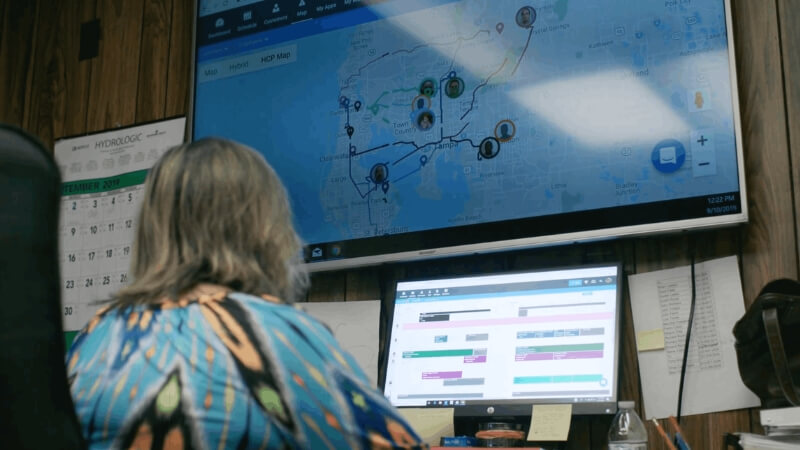
That matters because most contractors are not looking for constant reinvention. They want software that helps the office stay organized, keeps the field moving, and makes it easier to get estimates out, collect payments, and follow up with customers without stitching together multiple tools. Housecall Pro's positioning in 2026 is still centered on exactly that use case.
If you're evaluating platforms more broadly, it helps to understand where it fits within the larger ecosystem of contractor CRM and service business tools.
The Core Workflow Is Still the Point
If you strip away the promo language, Housecall Pro is still built around a very familiar contractor workflow:
- book the job
- put it on the schedule
- dispatch the technician
- track the customer and job details
- send the invoice
- collect payment
That basic chain has not changed-and honestly, that is a good thing. A platform like this does not become more valuable because it feels new. It becomes more valuable when your team can repeat the same process every day without friction.
You can review how Housecall Pro still frames these core features directly on their official features page.
It Still Favors Operational Simplicity Over Complexity
Even with newer additions in 2026-like expanded automation, integrations, and financial tools-the broader direction of the platform still leans toward supporting the same service-business workflow rather than replacing it with something more complex.
In other words, the extras are being layered onto the system, but the core experience remains recognizable.
That is important for smaller and mid-sized contractors. You do not want to buy into a tool this quarter and then discover six months later that the interface, setup logic, or day-to-day workflow has shifted so much your office has to relearn it.
Consistency Lowers Adoption Risk
This is the part a lot of reviews miss.
When a software platform stays structurally consistent, it reduces one of the biggest hidden costs in adoption: internal disruption. Your dispatcher does not need to relearn the board. Your office manager does not need to rebuild the billing process from scratch. Your techs are not fighting a totally different mobile workflow every time the company decides to "modernize" something.
If you're considering implementation, it's worth reviewing how platforms like this are typically set up and integrated into real workflows. We break that down in more detail on our Housecall Pro platform overview.
Bottom Line
What hasn't changed is the part that probably matters most: Housecall Pro is still fundamentally a scheduling, dispatch, CRM, invoicing, and payments platform for service businesses.
The packaging may be sharper in 2026, and the entry point may be easier, but the core reason to consider it is still the same.
What These Changes Actually Mean for Your Business
On paper, a pricing discount and smoother onboarding don't sound like major shifts.
But for a contractor evaluating software in 2026, they directly impact one thing: whether you actually move forward or keep putting it off.

The Barrier to Entry Is Lower Than It Was Before
Most service businesses don't struggle because they lack tools-they struggle because switching tools feels like a project.
Between setup, training, and the risk of disrupting your current workflow, it's easy to delay the decision indefinitely.
The combination of a discounted first year and a more streamlined onboarding process lowers that resistance. It makes it easier to justify getting started now instead of revisiting the decision months from now.
That doesn't guarantee success-but it does remove one of the biggest excuses for not trying.
Time-to-Value Is Faster (If You Actually Use It)
A smoother onboarding experience means you can get from sign-up to real usage faster.
In practical terms:
- Your schedule can be set up quickly
- Your customer database starts building immediately
- Estimates and invoices can go out within days-not weeks
That "time-to-value" matters more than feature depth for most contractors.
If a system takes too long to implement, it gets abandoned. If it works quickly, it becomes part of your daily operation.
You are Not Betting on a Moving Target
Because the core platform hasn't drastically changed, you're not adopting something that's still figuring itself out.
You're stepping into a system that already has a defined workflow and predictable behavior.
That reduces risk in a way most people don't think about:
- You can train your team once instead of repeatedly
- You can build processes that won't need constant adjustment
- You can focus on using the system-not chasing updates
For a growing service business, that stability is often more valuable than having the newest features.
The Real Shift: It's Easier to Say "Yes" Now
This is the actual takeaway.
Housecall Pro didn't suddenly become a different product in 2026. What changed is that it's now easier for a contractor to commit to trying it.
Lower upfront friction, faster onboarding, and a stable platform combine into a simpler decision:
"Is it worth trying now?" instead of "Should I rethink my entire system?"
If you've been evaluating tools like this but haven't pulled the trigger, this is exactly the kind of shift that tends to push people over the edge.
If you want to see how they're currently positioning that entry point, you can review it here: Housecall Pro.
We may receive a referral if you decide to use it, but the point is understanding how the onboarding and pricing are structured-not pushing a decision.
Who Should Seriously Consider Housecall Pro Right Now
Housecall Pro is not built for every type of business-and that's exactly why it works well for the right ones.
If your operation fits a certain profile, the platform makes immediate sense. If not, you'll feel friction pretty quickly.
Small to Mid-Sized Service Businesses
If you're running a service-based business with a small team-typically anywhere from a solo operator up to 10-15 technicians-Housecall Pro is built for that scale.
You don't need a dedicated operations team to manage it, and you don't need a complex tech stack to make it work. It's designed to handle the day-to-day without overcomplicating things.
This is especially relevant for contractors in industries like HVAC, plumbing, electrical, garage doors, and general home services. If that's your world, you're exactly who the platform is targeting.
Businesses Still Running on Paper, Spreadsheets, or Disconnected Tools
If your current workflow involves some mix of:
- paper invoices or handwritten notes
- text messages for scheduling
- spreadsheets to track jobs or customers
- separate tools that don't talk to each other
...then Housecall Pro can clean that up fast.
You're not replacing a highly optimized system-you're consolidating a scattered one. That's where the biggest gains usually come from.
Owners Who Want More Structure Without Enterprise-Level Complexity
There's a gap between "just get it done" operations and full-scale enterprise systems.
Housecall Pro sits right in that middle.
If you're at the point where:
- jobs are slipping through the cracks
- follow-ups are inconsistent
- billing is delayed or messy
- you don't have a clear view of what's scheduled or completed
...this kind of platform introduces structure without forcing you into a heavy, overbuilt system.
If you want a deeper breakdown of how platforms like this are typically implemented, you can review our Housecall Pro platform overview.
Businesses That Actually Plan to Use the System Daily
This sounds obvious, but it's where most failures happen.
Housecall Pro works best when it becomes part of your daily workflow-not something you log into once a week.
If you're committed to:
- scheduling jobs inside the system
- sending estimates and invoices through it
- tracking customers consistently
...you'll get value out of it.
If you're not, no CRM is going to fix that.
Housecall Pro makes the most sense for contractors who need structure, want to simplify their workflow, and are ready to actually use a system consistently.
If that's where your business is right now, it's worth taking a serious look-especially with the lower barrier to getting started in 2026.
Who Should NOT Use Housecall Pro (At Least Not Yet)
Housecall Pro is a solid platform-but it's not a universal fit.
If your business doesn't align with how it's designed, you'll feel that friction quickly. And in most cases, that leads to poor adoption or abandoning the system altogether.

Large or Highly Complex Operations
If you're running a larger company with multiple departments, layered approval processes, or highly customized workflows, Housecall Pro may feel limiting.
It's designed for simplicity and speed-not deep customization. Once you start needing advanced reporting, complex job costing, or highly specific automation, you may outgrow what it offers.
At that point, you're usually looking at more robust (and more complex) systems-not something in this category.
Businesses That Need Heavy Customization
If your workflow doesn't follow a fairly standard service model, expect friction.
Housecall Pro works best when your process looks like:
- customer requests service
- job is scheduled and dispatched
- work is completed
- invoice is sent and paid
If your business involves:
- custom quoting logic
- multi-stage project management
- complex internal approvals
- non-standard billing structures
...you may find yourself working around the system instead of with it.
Teams That Aren't Ready to Change How They Operate
This is the most common failure point-and it has nothing to do with the software.
If your team is not willing to:
- move scheduling into a centralized system
- standardize how jobs are tracked
- consistently use digital estimates and invoices
...then adopting any CRM-Housecall Pro included-is going to fall flat.
The tool doesn't fix inconsistent behavior. It only amplifies good processes.
Businesses Already Deeply Invested in Another System
If you're already running a system like Jobber, ServiceTitan, or another field service platform-and it's working-switching just for the sake of switching rarely makes sense.
There needs to be a clear gap or problem you're solving. Otherwise, you're introducing disruption without a meaningful upside.
If you're weighing that kind of decision, it's worth comparing tools directly rather than assuming one is universally better.
The Real Risk Isn't the Software-It's Misalignment
Most failed CRM implementations don't fail because the platform is bad. They fail because the business and the tool aren't aligned.
Housecall Pro is built for a specific type of contractor and a specific style of operation. If that's not you, forcing it usually leads to frustration.
And if it is you, the simplicity is exactly what makes it work.
Final Verdict: Is Housecall Pro Worth It in 2026?
Yes-for the right type of contractor, it's absolutely worth considering in 2026.
But not because the platform suddenly changed.
Housecall Pro didn't roll out a major overhaul or introduce a completely new system. What changed is the entry point. It's easier to get started, easier to evaluate, and easier to commit without overthinking the decision.
That matters more than most feature updates.
If You're Still Deciding, Focus on This
Forget the feature comparisons for a second. The more useful question is:
Will this system actually get used in your business?
If the answer is yes-because it fits your workflow, your team can adopt it, and it simplifies how you operate-then it's a good decision.
If not, no CRM is going to fix that.
Why Housecall Pro Is Getting More Attention Right Now
In 2026, Housecall Pro is benefiting from a simple but important shift:
- lower friction to get started
- more direct onboarding
- a pricing incentive that makes testing it easier
That combination is enough to move a lot of contractors from "thinking about it" to actually trying it.
And for most businesses, that's the real hurdle.
The Real Answer
If you're running a small to mid-sized service business, need better structure, and are ready to use a system consistently, Housecall Pro is a strong option.
If you're looking for something highly customized, deeply complex, or you're not ready to standardize how your business operates, it's probably not the right move right now.

Start With Housecall Pro
If you want to evaluate it properly, start with the current onboarding flow and offer. It's the fastest way to see if it actually fits your business.
We may receive a referral if you use our link, at no additional cost to you.
If you'd rather not figure it out on your own-or you want to make sure it's set up around your actual workflow-that's where implementation matters more than the platform itself.
You can review how we approach that here: Housecall Pro implementation.