



Most field service companies don't actually have a software problem. They have a workflow problem hiding inside disconnected systems, manual dispatching, missed follow-ups, and technician communication gaps.
CIRRIUSbusiness helps HVAC, plumbing, electrical, roofing, cleaning, and restoration contractors evaluate, implement, and optimize field service management software that supports operational growth instead of creating more administrative chaos.
For many growing field service companies, operational problems do not start in the field — they start in disconnected systems.
One team is scheduling jobs in spreadsheets. Dispatch updates are happening through text messages. Leads live inside one platform while invoices live somewhere else. Technicians are calling the office for job details, customers are waiting on updates, and management is trying to piece together performance data after the fact.
The result?
Missed appointments. Scheduling bottlenecks. Technician communication gaps. Delayed invoicing. Lost follow-ups. Frustrated office staff. Slower cash flow.
That operational friction becomes increasingly expensive as teams grow.
What works for a company with three technicians often begins breaking down at ten. By the time a business reaches 20, 50, or 100 technicians, manual processes and disconnected software can quietly create major inefficiencies across dispatching, customer communication, routing, estimating, invoicing, and technician utilization.
Modern field service businesses - especially HVAC, plumbing, electrical, roofing, cleaning, and restoration companies - increasingly rely on field service management software to centralize operations and improve visibility across the entire customer lifecycle.
The right platform does more than schedule jobs.
It connects CRM, dispatching, technician scheduling, work orders, estimates, invoicing, mobile field teams, customer communication, and reporting into one operational workflow that actually scales.
At CIRRIUSbusiness, we help contractors evaluate, implement, and optimize field service management software based on how their business actually runs — not how software sales demos say it should run.
Field service management software (FSM software) is an operational platform designed to help service-based contractors manage scheduling, dispatching, customer relationships, technician workflows, estimates, invoicing, payments, and day-to-day field operations from a centralized system.
For HVAC, plumbing, electrical, roofing, cleaning, restoration, and other service businesses, field service management software acts as the operational hub connecting the office to technicians in the field.

Instead of juggling disconnected spreadsheets, text messages, phone calls, calendars, and invoicing systems, contractors can manage the full service workflow in one platform.
In practical terms, field service management software helps businesses manage the entire job lifecycle:
Lead & Customer Management (CRM)
Track incoming leads, customer history, service locations, estimates, and communication from a centralized customer relationship management (CRM) system.
This helps office staff avoid lost opportunities while giving technicians better visibility into customer history before arriving on-site.
Scheduling & Dispatching
Assign jobs based on technician availability, skillset, geography, urgency, and route density.
Modern contractor dispatch software makes it easier to manage recurring maintenance visits, same-day emergency calls, reschedules, and technician utilization without relying on whiteboards or manual coordination.
Technician Mobile Apps
Field technicians receive work orders, customer details, service notes, photos, estimates, and job updates directly through a mobile field team app.
This reduces office back-and-forth, improves communication, and helps technicians stay productive in the field.
Estimates, Invoicing & Payments
Create estimates, collect approvals, generate invoices, and process payments from one platform.
For many contractors, reducing delays between completed work and payment collection creates a measurable improvement in cash flow.
Route Management & Job Tracking
Dispatchers and managers gain better visibility into technician locations, job status, route efficiency, and appointment timing.
This becomes increasingly important as businesses grow beyond a handful of technicians and scheduling complexity increases.
Workflow Automation
Many field operations software platforms automate repetitive tasks such as:
- Appointment reminders
- Technician notifications
- Estimate follow-ups
- Recurring maintenance scheduling
- Invoice reminders
- Review requests
Automation helps reduce administrative overhead while improving customer communication consistency.
Reporting & Operational Visibility
Business owners gain access to operational reporting around:
- Revenue trends
- Technician utilization
- Job profitability
- Lead sources
- Close rates
- Recurring service performance
Better visibility helps contractors make more informed operational decisions instead of relying on gut instinct alone.
At its core, field service management software helps service businesses operate more efficiently by connecting office operations, mobile technicians, customer communication, and financial workflows into a single operational system.
The right platform is not simply software.
It becomes the operational backbone of a growing service business.

Modern field service software helps connect office teams, dispatching, scheduling, and technicians in the field.
Choosing field service management software is not just about comparing feature lists. The right platform should support how your service business actually operates — from lead intake and scheduling to technician communication, invoicing, payment collection, and reporting.
For growing HVAC, plumbing, electrical, and service contractors, the best platform is the one that reduces operational friction instead of creating another system your team has to babysit.
CRM & Lead Management
A strong field service CRM should track leads, customers, service locations, estimates, communication history, and follow-up activity in one place.
This helps office teams respond faster, avoid missed opportunities, and give technicians better customer context before they arrive on-site.
Scheduling & Dispatching
Scheduling and dispatch tools should help assign jobs based on technician availability, skillset, geography, urgency, and route efficiency.
For busy contractors, contractor dispatch software should make it easier to manage emergency calls, recurring visits, reschedules, and technician utilization without constant manual coordination.
Technician Mobile Apps
A mobile field team app gives technicians access to work orders, customer notes, job photos, service history, estimates, and status updates from the field.
This reduces office calls, improves job documentation, and keeps technicians moving instead of waiting for basic information.
Estimates & Invoicing
Estimate and invoicing tools should help contractors create quotes, collect approvals, generate invoices, and move completed work toward payment quickly.
The business impact is simple: fewer billing delays, cleaner customer communication, and better cash flow.
Payment Collection
Modern service platforms should support online payments, saved payment methods, deposits, and automated payment reminders where appropriate.
For residential and commercial service businesses, easier payment collection reduces administrative drag and improves revenue timing.
Route Optimization
Route and dispatch visibility helps contractors reduce windshield time, improve appointment timing, and increase daily technician capacity.
This becomes especially important for teams managing multiple crews, emergency calls, recurring maintenance routes, or dense local service areas.
Service Agreements
Recurring service agreement tools help manage maintenance plans, repeat visits, customer reminders, and predictable revenue workflows.
This is especially valuable for HVAC, plumbing, cleaning, restoration, and other service businesses that rely on repeat customer relationships.
Reporting & Analytics
Reporting should give owners visibility into revenue, lead sources, technician utilization, job profitability, close rates, and recurring service performance.
Without reporting, contractors are often guessing. With the right data, they can make better decisions about staffing, pricing, marketing, and operations.
Automation Workflows
Service business automation can reduce repetitive admin work through appointment reminders, estimate follow-ups, invoice reminders, technician notifications, and review requests.
Platforms like Jobber and Housecall Pro can support many of these workflows when configured around the business process properly.
Customer Communication
Customer communication tools should help contractors send appointment confirmations, technician updates, estimate follow-ups, invoice reminders, and review requests.
Clear communication reduces no-shows, improves customer trust, and keeps the office from answering the same status questions all day.
Not sure which features matter most for your workflow? CIRRIUSbusiness can help review your current process and identify the software capabilities that actually support your operations.
Compare leading field service management software platforms based on dispatching, CRM, scheduling, invoicing, technician workflows, and operational fit.
The best field service management software depends on how your contractor business actually operates. A five-truck residential service company does not need the same system architecture as a multi-location commercial contractor with complex service agreements, inventory requirements, and layered reporting needs.
Below is a practical comparison of popular field service platforms based on operational fit, workflow strengths, and where each system can create friction if it is not matched to the right business model.
Jobber
Best fit company size: Solo operators through growing service teams, especially companies that need cleaner quoting, scheduling, invoicing, payment collection, and customer follow-up without enterprise-level complexity.
- Operational strengths: Clean job workflow, approachable CRM, estimates, scheduling, invoicing, online payments, client communication, and service business automation.
- Weaknesses: Can become limiting for larger multi-location operations, advanced commercial workflows, complex inventory needs, or deeply customized reporting requirements.
- Best use cases: Residential service, recurring maintenance, small commercial work, route-based teams, customer follow-up, and operational cleanup for growing contractors.
- Ideal contractor types: HVAC, plumbing, electrical, cleaning, landscaping, roofing service, and other owner-led service companies.
Housecall Pro
Best fit company size: Small to mid-size home service companies that need strong scheduling, dispatching, customer communication, invoicing, and field team coordination.
- Operational strengths: Scheduling, dispatch, estimates, customer management, job tracking, review management, service plans, reporting, and technician communication.
- Weaknesses: May require careful setup to avoid messy workflows as teams add more services, locations, technicians, price books, and automation rules.
- Best use cases: Residential service businesses that need better office-to-field visibility, appointment communication, recurring work, and streamlined payment collection.
- Ideal contractor types: HVAC, plumbing, electrical, handyman, cleaning, appliance repair, landscaping, and other home service companies.
ServiceTitan
Best fit company size: Larger residential or commercial trade contractors with established teams, higher call volume, deeper reporting needs, and more complex operational management.
- Operational strengths: CRM, dispatching, proposal workflows, job costing, reporting, call center workflows, technician performance visibility, and management-level operational controls.
- Weaknesses: More complexity, heavier implementation demands, and potentially more system than smaller contractors need.
- Best use cases: High-volume service teams, emergency dispatch, sales-driven service departments, performance tracking, and multi-department operations.
- Ideal contractor types: HVAC, plumbing, electrical, garage door, commercial service, and larger home service organizations.
FieldEdge
Best fit company size: Small to mid-market contractors that want field service management software with strong operational visibility and accounting workflow alignment.
- Operational strengths: Scheduling, dispatching, customer management, performance dashboards, service agreements, quotes, invoicing, and QuickBooks integration.
- Weaknesses: Implementation quality matters. If customer records, service agreements, accounting processes, or dispatch workflows are messy, the system can expose that mess quickly.
- Best use cases: Contractors that rely heavily on QuickBooks, recurring service work, maintenance agreements, and office-driven dispatch management.
- Ideal contractor types: HVAC, plumbing, electrical, and other service contractors with accounting-heavy workflows.
Simpro
Best fit company size: Mid-size to larger trade businesses managing quoting, scheduling, project/service workflows, invoicing, mobile technicians, and commercial operational complexity.
- Operational strengths: Quoting, scheduling, invoicing, payments, job workflows, field-to-office coordination, mobile technician access, and operational process control.
- Weaknesses: Can require more planning and implementation discipline than simpler platforms. Weak process mapping will create friction.
- Best use cases: Commercial-heavy teams, asset/service workflows, operational reporting, job planning, and businesses that need stronger process structure.
- Ideal contractor types: Electrical, HVAC, facilities maintenance, commercial service, and complex field operations teams.
Need a closer look at Jobber vs. Housecall Pro?
For many growing contractors, the first serious decision comes down to Jobber or Housecall Pro. We break down the operational differences in our comparison guide.
Software demos are polished. Your workflow is where the truth shows up. CIRRIUSbusiness helps contractors compare platforms based on dispatch, CRM, scheduling, invoicing, technician workflows, and growth readiness.
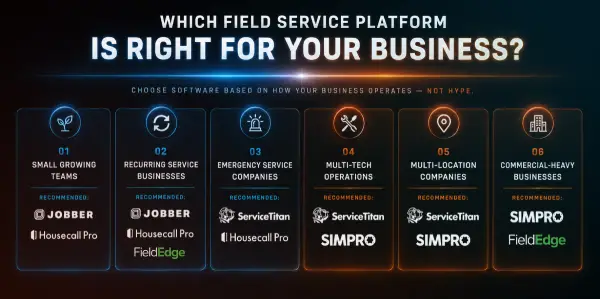
Compare contractor software recommendations based on business size, recurring service workflows, dispatch complexity, technician operations, and commercial requirements.
The right field service management software depends on more than features. The best platform for a five-tech residential service business may create unnecessary friction for a multi-location contractor managing emergency dispatch, recurring service agreements, technician utilization, and commercial workflows.
Use the framework below to identify which systems typically align best with how your business actually operates.
Small Growing Teams
Best fit: Jobber or Housecall Pro
Smaller teams usually need clean scheduling, simple dispatching, fast estimates, easy invoicing, and customer follow-up without enterprise complexity.
Recurring Service Businesses
Best fit: Jobber, Housecall Pro, or FieldEdge
Recurring service companies need maintenance schedules, repeat visits, customer reminders, service agreements, and predictable workflow automation.
Emergency Service Companies
Best fit: ServiceTitan or Housecall Pro
Emergency-driven operations need fast intake, responsive dispatch, technician availability visibility, customer communication, and clean handoffs from call to job.
Multi-Tech Operations
Best fit: ServiceTitan or simPRO
Once technician utilization, route density, job costing, reporting, and department-level visibility become critical, simpler systems may start to feel tight.
Multi-Location Companies
Best fit: ServiceTitan or simPRO
Multi-location contractors need stronger process control, reporting consistency, role-based workflows, dispatch visibility, and scalable operational structure.
Commercial-Heavy Businesses
Best fit: simPRO or FieldEdge
Commercial service teams often need service agreements, asset history, job planning, invoicing discipline, and operational reporting that supports longer-term customer relationships.
Still between two platforms?
That is usually where workflow mapping matters more than another demo. CIRRIUSbusiness helps contractors compare field service CRM, dispatching, scheduling, invoicing, technician mobile app needs, and automation requirements before committing to a platform.

Even strong field service management software can underperform when workflows, technician adoption, automation, and operational setup are not implemented strategically.